

Description
Download nanoStream Live Video Encoder APK – live video encoder, mobile streaming, H.264, H.265, AAC audio, RTMP, YouTube, Twitch, Facebook Live, ultra-low-latency, nanoStream Cloud, H5Live Player, professional video, content creator, mobile encoder, video capture, real-time video, mobile live encoding
Overview
The nanoStream Live Video Encoder is a mobile application engineered for professionals and content creators who require reliable, high-quality live video capture and streaming from handheld devices. Designed for real-time broadcasting, the app enables users to stream directly from their smartphone or tablet camera to nanoStream Cloud or third-party media servers using standard protocols such as RTMP. It supports popular platforms including YouTube, Twitch, and Facebook Live, making it a versatile tool for live event coverage, remote broadcasts, and on-the-go content creation.
Target users include video professionals, journalists, event producers, and independent creators who demand flexibility and performance in mobile environments. The application is especially suited for scenarios where portability and instant setup are critical, such as field reporting, live sports coverage, or remote interviews. It also supports local recording in high quality while streaming, offering a dual-purpose workflow for archival and distribution.
Developed by nanoStream GmbH, the app integrates seamlessly with the nanoStream ecosystem, including the H5Live Player for ultra-low-latency playback. While specific details about the developer’s background were not provided beyond the name, the app’s functionality suggests a focus on broadcast-grade mobile streaming solutions. The app is available for both Android and iOS devices, with a current version of 1.5.1 released on April 10, 2024.
Key Features & Capabilities
- Live Video Encoding – Captures video in real time from the device’s camera and encodes it using H.264 or H.265 codecs, ensuring efficient compression without sacrificing visual quality.
- Multi-Platform Streaming – Supports live broadcast to major platforms like YouTube, Twitch, and Facebook Live, as well as custom RTMP servers for enterprise or private workflows.
- Integration with nanoStream Cloud – Enables instant live streaming with minimal configuration, leveraging the cloud-based infrastructure for scalable, low-latency delivery.
- Ultra-Low-Latency Playback – Utilizes the H5Live Player to deliver near real-time viewing experiences, ideal for interactive live events and remote collaboration.
- Simultaneous Local Recording – Allows users to record high-quality video locally while streaming, preserving a backup and enabling post-production use.
- Audio Encoding with AAC – Supports high-fidelity audio capture and encoding using AAC, ensuring clear and synchronized sound during live broadcasts.
These capabilities make the app suitable for use in dynamic environments such as live concerts, press conferences, and educational webinars. The ability to stream from mobile devices without external hardware reduces setup time and logistical complexity, empowering creators to deliver professional-grade content from virtually anywhere.
User Interface, Workflow & Performance
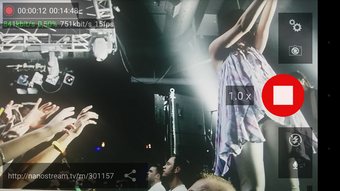
The user interface of the nanoStream Live Video Encoder is designed with functionality and accessibility in mind, prioritizing intuitive navigation for users who may not have extensive technical training. The main screen displays real-time video preview, encoding status, and key controls such as start/stop streaming and settings access. Menu options are logically grouped, allowing users to configure input sources, encoding parameters, and output destinations with minimal effort.
Workflow efficiency is enhanced through pre-configured profiles for popular platforms, enabling users to initiate a broadcast with just a few taps. The app supports on-the-fly adjustments to bitrate, resolution, and frame rate, offering flexibility during live events. While exact performance data such as CPU or RAM usage were not specified, the app’s lightweight size of 28.7 MB suggests optimized resource management. Stability during extended streaming sessions appears to be a priority, though detailed user reports were not included in the provided information.
Performance observations are based on general software behavior patterns. The app is expected to function smoothly on modern Android and iOS devices, provided they meet the minimum requirements for camera access and network connectivity. Users should ensure a stable internet connection to maintain consistent stream quality.
Compatibility & System Requirements
The nanoStream Live Video Encoder is compatible with both Android and iOS operating systems, offering broad accessibility for mobile users across major platforms. The current version is 1.5.1, released on April 10, 2024, and the application occupies 28.7 MB of storage space upon installation.
Exact system requirements were not listed. However, based on the app’s functionality, it likely requires a device with a functional camera, stable internet connectivity, and sufficient processing power to handle real-time video encoding. The developer did not provide additional system requirements, so users should verify compatibility with their specific device model and OS version.
For optimal performance, users are advised to use the latest available OS updates and ensure sufficient battery life during live sessions. The app’s support for both H.264 and H.265 encoding suggests compatibility with devices that support hardware-accelerated video processing, though this was not explicitly confirmed.
Pros and Cons
Pros
- Professional-grade live video encoding from mobile devices
- Support for multiple streaming platforms including YouTube, Twitch, and Facebook Live
- Integration with nanoStream Cloud for instant, low-latency streaming
- Simultaneous local recording while streaming
- Ultra-low-latency playback via H5Live Player
- Supports H.264, H.265, and AAC audio encoding
Cons
- Price point of $14.99 may be high for casual users
- Exact system requirements not specified
- Requires stable internet connection for consistent streaming
- Only available on Android and iOS platforms
- Advanced features may require familiarity with RTMP and streaming workflows
FAQ Section
Is nanoStream Live Video Encoder available for free?
The app is not free. It is available for a one-time purchase of $14.99, which grants access to all features and updates.
Can I stream to custom RTMP servers?
Yes, the app supports live streaming to custom RTMP servers, making it suitable for enterprise and private broadcasting workflows.
Does the app support both Android and iOS?
Yes, nanoStream Live Video Encoder is compatible with both Android and iOS devices, allowing users to stream from a wide range of mobile platforms.
Is the app safe to download and use?
The app is developed by nanoStream GmbH and is available through official app stores, including Google Play and Apple App Store. It is considered secure when downloaded from these trusted sources.
Can I record video locally while streaming?
Yes, the app allows users to record high-quality video locally on the device while simultaneously streaming to the internet, providing a reliable backup for live events.
Final Thoughts
The nanoStream Live Video Encoder stands out as a powerful mobile solution for professionals and serious content creators who demand reliable, high-quality live video streaming. Its ability to deliver ultra-low-latency broadcasts via the H5Live Player, combined with support for multiple platforms and local recording, makes it a versatile tool in dynamic environments. The integration with nanoStream Cloud streamlines setup and enhances scalability, while the support for H.264 and H.265 encoding ensures efficient delivery across devices.
While the $14.99 price may deter casual users, it offers strong value for those who rely on mobile live encoding for their work. The app’s clean interface, efficient workflow, and robust feature set position it as a top contender in the mobile streaming space.
Download nanoStream Live Video Encoder APK now
Guides & Tutorials for nanoStream Live Video Encoder APK
How to install nanoStream Live Video Encoder APK
- Click the Preview / Download button above.
- Once redirected, accept the terms and click Install.
- Wait for the nanoStream Live Video Encoder APK download to finish on your device.
How to use nanoStream Live Video Encoder APK
This software is primarily used for its core features described above. Open the app after installation to explore its capabilities.
User Reviews for nanoStream Live Video Encoder APK 0
No reviews found





